


TidyCal vs Cal.com: which should you choose?
Our top pick is TidyCal (Best one-time Cal.com alternative, $29 once on AppSumo). $29 once gets unlimited bookings and booking types, recurring and group bookings, Stripe and PayPal payments, packages, subscriptions and coupon codes. The $79 Agency tier adds four seats with round-robin and collective meetings, and AppSumo gives you 60 days to request a refund.
The deals at a glance
| Tool | Suits | Price |
|---|---|---|
| TidyCal | Best one-time Cal.com alternative | $29 |
Cal.com and TidyCal both promise the same thing: a booking link that ends the back-and-forth emails. Cal.com is a venture-backed scheduling platform with a real free plan. TidyCal is AppSumo’s own scheduling tool, sold for $29 once. If you’re weighing TidyCal vs Cal.com, here’s the short answer: solo users who only need simple booking links can live happily on Cal.com Free, but coaches who sell sessions and small teams that want round robin get more for their money from TidyCal’s one-time deal.
Get TidyCal for $29 on AppSumo →
This comparison uses AppSumo’s TidyCal listing and Cal.com’s own pricing page, both checked on November 14, 2026. If you already know you prefer paying once, see the deal on AppSumo.
Which should you buy, TidyCal or Cal.com?
Buy TidyCal if you sell sessions, packages or subscriptions, or if you run a team of two to four and want round robin without a per-seat bill. Stay on Cal.com Free if you’re one person who only needs booking links and doesn’t sell anything beyond single paid calls.
Pick Cal.com’s paid plans if you need routing forms, a company subdomain, SAML SSO or compliance paperwork such as SOC 2 and HIPAA. Those are the Organizations-level features TidyCal doesn’t try to match.
Both tools handle the daily basics well. A client opens your link, sees times your calendar shows as free, books, and gets a confirmation with a video link. The real differences are how you pay, what you can sell, and how teams are priced.
TidyCal is an AppSumo Original, built by the AppSumo team. The listing shows a 4.32 rating from 937 reviews. For every detail of the deal, read our full TidyCal review.
How much does TidyCal cost compared with Cal.com?
TidyCal costs $29 once for one person or $79 once for four seats. Cal.com is free for one user, then $12 per user a month for Teams and $28 per user a month for Organizations, both billed yearly.
Cal.com’s pricing page says yearly billing saves 25%. The table uses the yearly prices it shows.
| Plan | Price | Year 1 | 3 years |
|---|---|---|---|
| TidyCal Individual | $29 once | $29 | $29 |
| TidyCal Agency (4 seats) | $79 once | $79 | $79 |
| TidyCal Pro (optional) | $8.25/mo billed yearly | $99 | $297 |
| Cal.com Free (1 user) | $0 | $0 | $0 |
| Cal.com Teams (1 user) | $12/user/mo billed yearly | $144 | $432 |
| Cal.com Teams (4 users) | $12/user/mo billed yearly | $576 | $1,728 |
| Cal.com Organizations (4 users) | $28/user/mo billed yearly | $1,344 | $4,032 |
| Cal.com Enterprise | Custom | Quote | Quote |
For a solo user who doesn’t need paid team features, Cal.com Free is hard to beat on price. That’s worth saying plainly.
The math flips once you add people. Four seats on Cal.com Teams cost $576 a year. TidyCal Agency gives you plus three team members, a team booking page, round robin and collective meetings for $79, one time. Over three years that gap grows to $1,649.
What do you get on each free plan?
Cal.com’s Free plan is generous for one person. TidyCal also has a free plan at tidycal.com, but the deal is the real reason to look at it, because $29 unlocks the paid features for life.
Cal.com’s pricing page lists these Free features:
- 1 user, with unlimited links and calendar connections.
- Unlimited meetings.
- Email and SMS notifications.
- Integrations with 100+ apps, plus a mobile app and browser extension.
- Stripe and PayPal payments.
- Two-way Salesforce and HubSpot sync.
- One-click import of Calendly events.
Round robin, collective and managed links, recurring events, routing forms, booking analytics and branding removal sit on the Teams plan.
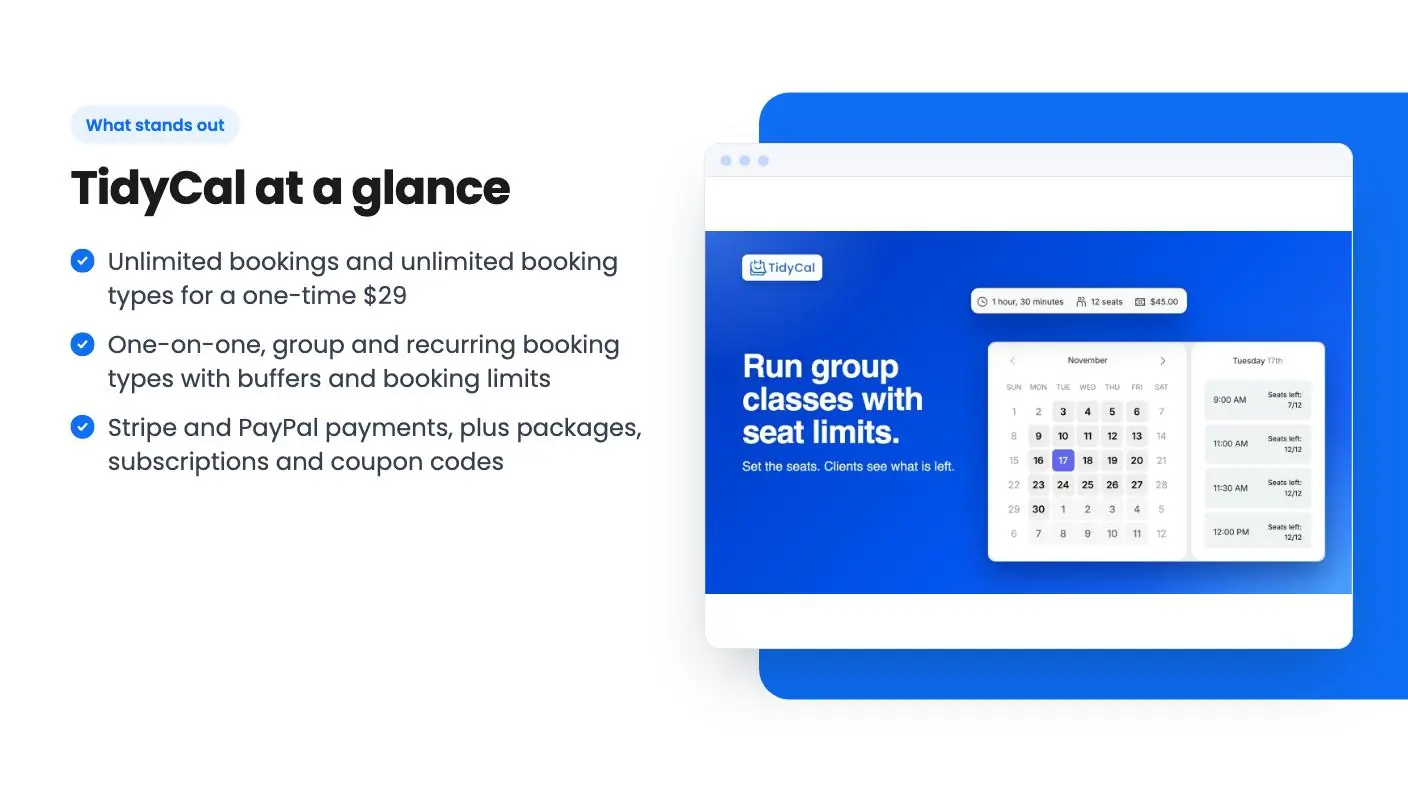
That last point matters for coaches. TidyCal’s $29 lifetime tier includes one-on-one, group and recurring booking types, so weekly check-ins and retainers work without upgrading.
Which TidyCal lifetime tier fits you best?
The $29 tier is built for one person. The $79 tier adds the team pieces: you plus three teammates, a team page, round robin, collective meetings, a custom reply-to and 10 SMS reminders a month in the US and Canada.
Both tiers share the same caps. That means 10 integrated calendars, unlimited bookings, a 1% fee on paid bookings and the “Powered by TidyCal” bar. Custom domains and branding removal aren’t on either one. They belong to Pro.
Is Cal.com open source?
Cal.com’s open-source code now lives on as Cal.diy, an MIT-licensed community edition you run on your own server. The hosted Cal.com service is a separate commercial product with a free tier.
Cal.diy’s README describes it as a fork of Cal.com with the enterprise code removed. Teams, Organizations, Insights, Workflows and SSO/SAML aren’t included. It also warns that self-hosting needs real server and database skills and recommends it for personal, non-production use.
That’s a real option for developers who want full control and are happy to run Node.js and PostgreSQL. It isn’t a shortcut for a coach or agency that just wants a booking page today. For most readers comparing the two, the choice is between hosted Cal.com and hosted TidyCal.
How do TidyCal and Cal.com compare on features?
TidyCal leans toward selling sessions, with packages, subscriptions, coupons and built-in reviews. Cal.com leans toward teams and routing, with CRM sync on the free plan and enterprise controls higher up.
| Feature | TidyCal ($29 / $79 once) | Cal.com Free | Cal.com Teams ($12/user/mo) |
|---|---|---|---|
| Users | 1 (Agency: you + 3) | 1 | Per user |
| Bookings | Unlimited | Unlimited meetings | Unlimited meetings |
| Calendar connections | Up to 10 | Unlimited | Unlimited |
| Group and recurring bookings | Yes | Recurring on Teams | Yes |
| Stripe and PayPal payments | Yes, 1% platform fee | Yes | Yes |
| Packages and subscriptions | Yes | Not listed | Not listed |
| Coupon codes | Yes | Not listed | Not listed |
| Review collection | Yes | Not listed | Not listed |
| Round robin and collective | Agency tier | No | Yes |
| Routing forms | No | No | Yes |
| SMS reminders | Agency: 10/mo (US and Canada) | Email and SMS | Customizable email and SMS |
| CRM sync | Via Zapier | Salesforce and HubSpot | Salesforce and HubSpot |
| Branding removal | TidyCal Pro | No | Yes |
TidyCal connects Google, Outlook/Office 365 and Apple calendars, creates Zoom, Google Meet and Microsoft Teams links automatically, and links to Zapier for everything else.
Payments and selling sessions
Both tools take Stripe and PayPal payments. TidyCal goes further for people who sell their time. You can sell packages and subscriptions so clients prepay for several sessions, and create coupon codes for promotions.
TidyCal charges a 1% platform fee on paid bookings on Free and Lifetime plans, on top of Stripe or PayPal fees. TidyCal Pro has no platform fee. Cal.com’s pricing page doesn’t mention a platform fee, so check its terms if you take a lot of payments.
TidyCal also collects reviews after each completed booking and shows them on your booking page. For a coach or consultant, that social proof sits right where the client decides.
See the TidyCal deal on AppSumo
Teams and routing
TidyCal Agency includes you plus three team members, a team booking page, round-robin meetings, collective meetings and a custom reply-to address. Teammates don’t buy their own plan. They create a free account, accept your invite and set their own availability. Agency also lets you run several brands, each as a team with its own name, logo and page URL.
Cal.com Teams adds shared availability, round robin, managed and collective links, routing forms and booking analytics. Organizations adds unlimited sub-teams, routing by custom variables, a company subdomain, SAML SSO and SCIM, and SOC 2, HIPAA and ISO 27001 compliance.
If you route inbound leads to the right rep, or your security team needs SSO, Cal.com is the right tool. If you’re a small studio sharing client calls, TidyCal Agency covers it for a one-time $79.
Who should pick TidyCal, and who should pick Cal.com?
Pick TidyCal if you sell sessions or run a team of up to four and want to pay once. Pick Cal.com if you’re solo with simple needs and want $0, or if you need routing, SSO and compliance at company scale.
TidyCal is perfect for:
- Coaches selling packages or monthly subscriptions of sessions.
- Consultants who run free discovery calls and paid strategy sessions from one page.
- Tutors and trainers with weekly recurring sessions.
- Small agencies of up to four people that want round robin without per-seat fees.
- Anyone running several brands from one account on the Agency tier.
Get TidyCal for $29 on AppSumo →
Cal.com is the better pick for:
- Solo users who only need free booking links and don’t sell packages.
- Sales teams that need routing forms and Salesforce or HubSpot sync.
- Companies that need SAML SSO, SCIM or HIPAA and SOC 2 coverage.
- Developers who want to self-host the open-source Cal.diy edition.
- Teams that will grow well past four people.
What to check before you buy
Read the fine print on the listing first. You must activate your license within 60 days, and the deal is only for people without an existing paid TidyCal account.
If you run a second business on the $29 tier, the listing’s FAQ says to use a second account. Agency handles that with teams instead.
The listing doesn’t say how Cal.com data moves over, so plan on rebuilding by hand. Also confirm your clients are in the US or Canada if SMS reminders matter, because email is the only option elsewhere.
How do you switch from Cal.com to TidyCal?
Switching takes an afternoon. Start on TidyCal’s free plan, connect your calendars, rebuild your event types as booking types, then redeem the AppSumo license once you’re happy.
- Create a free account at tidycal.com.
- Connect your Google, Outlook or Apple calendars and your Zoom, Meet or Teams account.
- Recreate each Cal.com event type with the same length, buffers and booking limits.
- Connect Stripe or PayPal, then set up packages, subscriptions or coupons.
- Embed a single booking type or your whole booking page on your site.
- Swap the link in your email signature, website and proposals.
- Activate the AppSumo license within 60 days of purchase.
Note that the deal is only for people without an existing paid TidyCal account. AppSumo gives you 60 days to request a refund, so you can run real bookings before you commit.
The verdict: TidyCal or Cal.com
The fair answer to TidyCal vs Cal.com depends on what you do with your calendar. If you’re one person with simple needs, Cal.com Free is a strong, no-cost choice. If you sell your time, TidyCal’s packages, subscriptions, coupons and reviews make $29 once an easy call.
For teams of two to four, TidyCal Agency is the clear value pick. It costs $79 once against $576 a year for four Cal.com Teams seats. Cal.com keeps the lead for larger companies that need routing, SSO and compliance.
Still comparing? See TidyCal vs Calendly, our Calendly alternatives and Acuity Scheduling alternatives guides, and more tools in forms and scheduling lifetime deals. You can also browse every in-house AppSumo tool in our AppSumo Originals roundup.
Whichever way you lean, the free plan and 60-day refund window make TidyCal easy to test. See the deal on AppSumo to lock in the lifetime price.

Why each one made the list
- TidyCal: $29 once gets unlimited bookings and booking types, recurring and group bookings, Stripe and PayPal payments, packages, subscriptions and coupon codes. The $79 Agency tier adds four seats with round-robin and collective meetings, and AppSumo gives you 60 days to request a refund.
Frequently asked questions
Is TidyCal cheaper than Cal.com?
For one person, Cal.com's Free plan costs nothing, so it's cheaper on day one. For teams, TidyCal wins. Its $79 Agency deal covers four seats with round robin once, while Cal.com Teams is $12 per user a month billed yearly, or $576 a year for four people.
Is Cal.com really free?
Yes. Cal.com's pricing page lists a Free forever plan for one user with unlimited links and calendars, email and SMS notifications, 100+ app integrations and Stripe and PayPal payments. Team scheduling, round robin, routing forms and branding removal start on the Teams plan.
Is Cal.com open source?
Cal.com's open-source code is now published as Cal.diy, an MIT-licensed community edition you host yourself. Its README says it removes team, organization, workflow and SSO features and recommends it for personal, non-production use. The hosted Cal.com service is a paid product with a free tier.
Can TidyCal sell packages like Cal.com?
TidyCal's lifetime plans let you sell packages and subscriptions of sessions and create coupon codes, with payments through Stripe or PayPal. Cal.com's Free plan accepts Stripe and PayPal payments, but its pricing page doesn't list session packages.
Does TidyCal have round robin like Cal.com Teams?
Yes, on the $79 Agency tier. It includes you plus three team members, a team booking page, round-robin meetings and collective meetings. Teammates sign up for a free TidyCal account and accept your invite.
Can I remove branding in TidyCal or Cal.com?
Not on the cheapest plans of either tool. TidyCal lifetime plans show a Powered by TidyCal bar, which TidyCal Pro at $8.25 a month billed yearly removes. Cal.com lists branding removal as a Teams plan feature.
Topic guide