


The deals at a glance
| Tool | Suits | Price |
|---|---|---|
| TidyCal | Best value Calendly alternative | $29 |
Calendly is the scheduling tool most people already know. TidyCal is the one AppSumo built and sells for a single $29 payment. If you’re weighing TidyCal vs Calendly, the short answer is this: solo professionals and small teams get the same core booking features from TidyCal for far less money, while larger sales teams that need routing and CRM sync are better served by Calendly.
Get TidyCal for $29 on AppSumo →
Below we compare pricing, features, payments, team tools and branding, using AppSumo’s TidyCal listing and Calendly’s own pricing page as of November 2026. If you already know you want the one-time price, see the deal on AppSumo.
Which is better, TidyCal or Calendly?
TidyCal is better for solo coaches, consultants, freelancers and teams of up to four who want to stop paying monthly. Calendly is better for larger teams that need lead routing, Salesforce sync and enterprise security.
The two tools cover the same daily job. Someone clicks your link, picks a time that your calendar shows as free, gets a confirmation with a video link, and shows up. Both do that well. The difference is how you pay and how far up the team ladder you need to go.
TidyCal is an AppSumo Original, built by the AppSumo team. The listing shows a 4.32 rating across 937 reviews. Read our full TidyCal review for every detail of the deal.
How much does TidyCal cost compared with Calendly?
TidyCal costs $29 once (Individual) or $79 once (Agency, four seats). Calendly lists Standard at $10 per seat a month and Teams at $16 per seat a month, billed yearly, so one Standard seat costs $120 a year.
Here’s the cost side by side. Calendly prices come from its pricing page, billed yearly.
| Plan | Price | Year 1 | 3 years |
|---|---|---|---|
| TidyCal Individual | $29 once | $29 | $29 |
| TidyCal Agency (4 seats) | $79 once | $79 | $79 |
| TidyCal Pro (optional) | $8.25/mo billed yearly | $99 | $297 |
| Calendly Free | $0 | $0 | $0 |
| Calendly Standard (1 seat) | $10/seat/mo | $120 | $360 |
| Calendly Teams (4 seats) | $16/seat/mo | $768 | $2,304 |
| Calendly Enterprise | From $15k/year, 50-seat minimum | $15,000+ | $45,000+ |
The solo math is the heart of TidyCal vs Calendly. TidyCal Individual costs less than three months of Calendly Standard. Over three years you save $331 on a single seat.
The team math is bigger. Four people on Calendly Teams cost $768 a year. TidyCal Agency gives you plus three team members, round-robin and collective meetings for $79 once.
Calendly’s free plan is real, but it’s narrow. The pricing page limits it to one event type and one calendar connection. Most freelancers need at least two event types, such as a free intro call and a paid session, which pushes them to Standard.
Two TidyCal costs belong in your sum. Paid bookings carry a 1% platform fee on Free and Lifetime plans, on top of Stripe or PayPal fees. And branding removal plus a custom domain need TidyCal Pro. Even with Pro added, the yearly cost stays below one Calendly Standard seat.
TidyCal vs Calendly feature comparison
Both tools cover unlimited event types on paid plans, multiple calendars, video links and Stripe or PayPal payments. TidyCal adds packages, subscriptions and coupons on its lifetime tiers, while Calendly adds routing and deeper CRM connections on Teams.
| Feature | TidyCal Individual ($29 once) | TidyCal Agency ($79 once) | Calendly Standard ($10/seat/mo) | Calendly Teams ($16/seat/mo) |
|---|---|---|---|---|
| Event or booking types | Unlimited | Unlimited | Unlimited | Unlimited |
| Connected calendars | Up to 10 | Up to 10 | 6 | Not stated |
| Video links | Zoom, Meet, Teams | Zoom, Meet, Teams | Zoom, Meet, Teams | Zoom, Meet, Teams |
| Stripe and PayPal | Yes | Yes | Yes | Yes |
| Packages and subscriptions | Yes | Yes | Not listed | Not listed |
| Coupon codes | Yes | Yes | Not listed | Not listed |
| Round robin | No | Yes | No | Yes |
| Team or collective meetings | No | Yes | No | Yes |
| Lead routing | No | No | No | Yes |
| CRM connections | Zapier | Zapier | HubSpot, Mailchimp | Adds Marketo, Pardot, Salesforce sync |
| Automated reminders | Email + 10 SMS/mo (US and Canada) | Yes (channel not stated) | Yes (channel not stated) | |
| Seats | 1 | 4 | Per seat | Per seat |
“Not listed” means the feature doesn’t appear for that plan on the vendor’s pricing page, not that it’s confirmed missing.
Booking types and availability
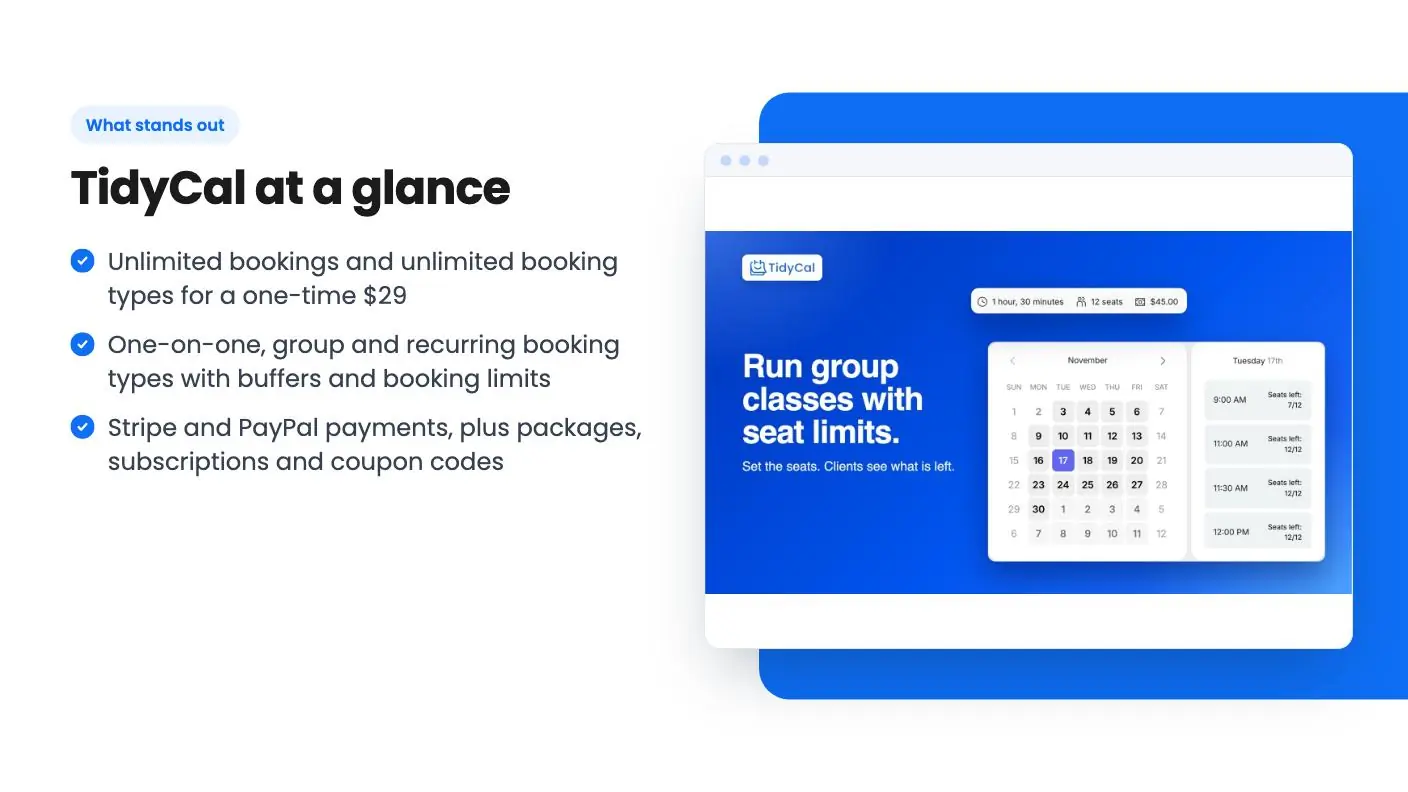
TidyCal lets you create one-on-one, group and recurring booking types. Each one gets its own availability, buffer time and booking limits. That covers discovery calls, weekly check-ins, workshops and retainers.
Calendly Standard unlocks unlimited event types and up to six calendar connections, plus automations and meeting reminders. On the core job of “let people book me at sensible times,” the two match.
Calendars and video
TidyCal connects Google, Outlook/Office 365 and Apple (iCal) calendars, up to 10 of them, and creates Zoom, Google Meet and Microsoft Teams links automatically. That’s enough for a consultant who keeps a work calendar, a personal calendar and a client calendar. Calendly’s pricing page also lists automatic Zoom, Google Meet and Microsoft Teams details, and Standard connects up to six calendars versus one on Free.
Payments and packages
This is where TidyCal stands out for coaches. Beyond charging at booking through Stripe or PayPal, you can sell packages and subscriptions so a client pays upfront for several sessions, and you can run coupon codes. Calendly Standard lists Stripe and PayPal connections, but its pricing page doesn’t list packages or coupons.
Which is better for teams?
Calendly is the better fit for sales teams of five or more that need routing, Salesforce sync or SSO. TidyCal Agency is the better value for teams of two to four that need a shared booking page and round robin.
TidyCal Agency includes you plus three team members, a team booking page, round-robin meetings, collective meetings and a custom reply-to address. Teammates don’t buy their own plan. They sign up for a free TidyCal account and accept your invite, then set their own availability. Agency also lets you run several brands, each as a team with its own name, logo and page URL.
Calendly Teams adds round-robin and team scheduling, lead qualification and routing, centrally managed event types, Marketo and Pardot connections, Salesforce meeting sync, and an optional SSO add-on. Enterprise adds Salesforce lookup routing, SSO/SAML, domain control and dedicated account support, starting at $15k a year with a 50-seat minimum.
If your calendar feeds a sales pipeline in Salesforce, pay for Calendly. If you’re a small agency or studio booking client calls, TidyCal Agency does the job for a one-time $79.
What about branding and custom domains?
Both tools put their name on the free experience. TidyCal’s lifetime plans keep a “Powered by TidyCal” bar and a TidyCal logo in emails, while Calendly’s comparison table doesn’t include branding removal on its free plan.
On TidyCal lifetime plans you can still pick a page style, add your logo and colors, and write your own confirmation and reminder emails. Removing the bar and using your own domain are part of TidyCal Pro.
For most coaches and freelancers, a small “Powered by” line at the bottom of the page doesn’t change whether a client books. If a fully white-label page matters to your brand, budget for TidyCal Pro or a paid Calendly plan.
When should you choose TidyCal over Calendly?
Choose TidyCal if you work alone or with up to three teammates, sell sessions or packages, and want to pay once. Choose Calendly if you need routing, Salesforce or Marketo sync, SSO, or seats for a large team.
Pick TidyCal if you are:
- A coach selling packages or subscriptions of sessions.
- A consultant running free discovery calls and paid strategy calls from one page.
- A freelancer who needs more than Calendly Free’s one event type.
- A small agency of up to four that wants round robin without per-seat fees.
- Someone running several brands from one account (Agency tier).
Pick Calendly if you are:
- A sales team that routes leads based on form answers.
- A company that needs Salesforce meeting sync or Marketo and Pardot connections.
- An organization that needs SSO/SAML and domain control.
- A team that wants a per-seat plan it can grow past four people without changing tools.
Get TidyCal for $29 on AppSumo →
How to switch from Calendly to TidyCal
Switching takes an afternoon. Sign up for TidyCal’s free plan, connect your calendars, rebuild your event types as booking types, then redeem the AppSumo license once you’re happy.
- Create a free account at tidycal.com.
- Connect Google, Outlook or Apple calendars and your Zoom, Meet or Teams account.
- Recreate each Calendly event type with the same duration, buffers and notice period.
- Connect Stripe or PayPal and set up any packages or coupons.
- Embed the booking page or a single booking type on your site with TidyCal’s embed script.
- Swap the link in your email signature, website and proposals.
- Redeem the AppSumo license within 60 days of purchase.
AppSumo gives you 60 days to request a refund, so you can run real bookings through TidyCal before cancelling Calendly. Note that the deal is only for people without an existing paid TidyCal account.
TidyCal vs Calendly: the verdict
For most solo professionals, the TidyCal vs Calendly decision is about money, and TidyCal wins it clearly. You get unlimited booking types, calendar sync, video links, payments and packages for $29 once instead of $120 a year.
Small teams win too. TidyCal Agency’s $79 covers four seats and round robin, which would cost $768 a year on Calendly Teams. Calendly keeps the edge for bigger sales teams that live in Salesforce or need enterprise security, and for that use case its price makes sense.
If you’re still comparing options, see our Calendly alternatives and Acuity Scheduling alternatives guides, and read about the other tools AppSumo builds in our AppSumo Originals roundup. Whichever way you lean on TidyCal vs Calendly, the free plan and the 60-day refund window make it easy to test.
See the deal on AppSumo to get TidyCal at the lifetime price.
Why each one made the list
- TidyCal: $29 once gets unlimited bookings and booking types, Stripe and PayPal payments, packages and automatic Zoom, Meet and Teams links, with a free plan and a 60-day refund window.
Frequently asked questions
Is TidyCal cheaper than Calendly?
Yes. TidyCal's AppSumo lifetime deal is $29 once for one person or $79 once for four seats. Calendly's pricing page lists Standard at $10 per seat a month and Teams at $16 per seat a month, billed yearly.
Is TidyCal as good as Calendly?
For solo scheduling, yes on the core jobs: unlimited booking types, calendar sync, automatic video links and Stripe or PayPal payments. Calendly goes further for larger teams with lead routing, Salesforce sync and enterprise controls.
Does the Calendly free plan compete with TidyCal?
Calendly's free plan is limited to one event type and one calendar connection. TidyCal's $29 lifetime tier includes unlimited booking types and up to 10 connected calendars.
Can TidyCal take payments like Calendly?
Yes. Both connect Stripe and PayPal. TidyCal adds packages, subscriptions and coupon codes on its lifetime tiers, and charges a 1% platform fee on paid bookings on Free and Lifetime plans.
Does TidyCal support round robin like Calendly Teams?
Yes, on the $79 Agency tier. It includes you plus three team members, a team booking page, round-robin meetings and collective meetings.
Can I remove branding in TidyCal?
Lifetime plans show a Powered by TidyCal bar and a TidyCal logo in emails. Removing them and using your own domain are part of TidyCal Pro at $8.25 a month billed yearly.